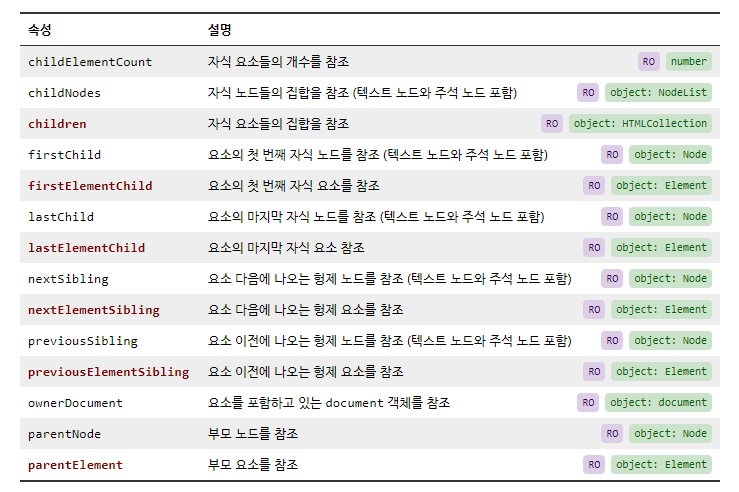

1. Element 객체의 속성 ①
- 요소의 크기, 위치와 관련된 속성
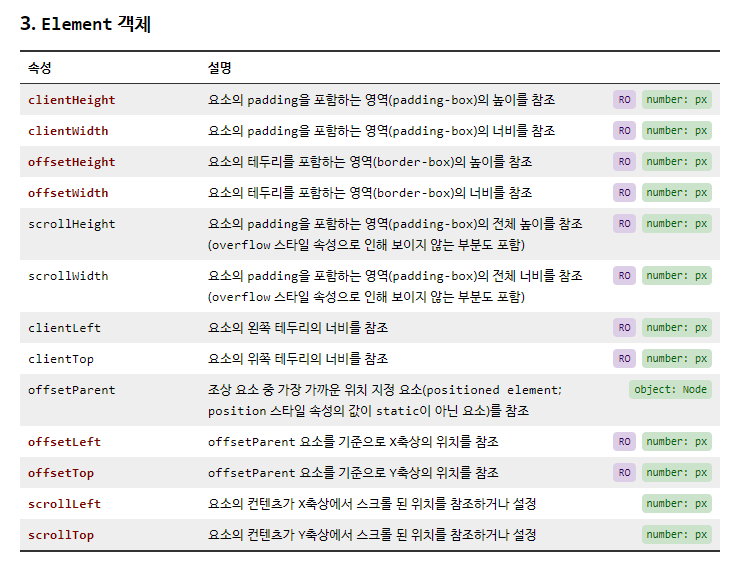
● HTML 문서상에서 요소의 위치
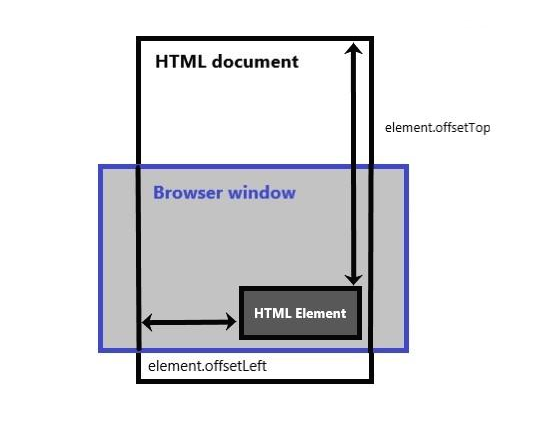
예시) offsetTop, offsetHeight 속성
<!DOCTYPE html>
<html>
    <head>
        <meta name="viewport" content="width=device-width">
        <meta charset="utf-8">
        <title>demo</title>
        <link rel="stylesheet" href="reset.css">
        <style>
            body {
                background-color: #111;
                color: white;
            }

            #list-container {
                background-color: #555;
                width: 300px;
                padding: 30px 0;
                border: 2px solid white;
                margin: 50px auto;
            }

            .header {
                font-size: 30px;
                font-weight: 900;
                letter-spacing: -2px;
                text-align: center;
                padding-bottom: 20px;
            }
            #list > li {
                font-size: 20px;
                text-align: center;
                padding: 10px 0;
            }

            #article-container {
                width: 90%;
                margin: 100px auto;
            }

            #article-container > h1 {
                border-bottom: 3px solid #555;
                margin-bottom: 20px;
            }

            #article-container > p {
                font-size: 20px;
                line-height: 1.8;
            }

        </style>
    </head>
    <body>
        <div id="list-container">
            <h1 class="header">Web Publising</h1>
            <ul id="list">
                <li>1. HTML</li>
                <li>2. CSS</li>
                <li>3. JavaScript</li>
                <li>4. jQuery</li>
            </ul>
        </div>
        <div id="article-container">
            <h1 class="header" style="text-align: left;">Lorem ipsum dolor sit amet</h1>
            <p>
                Lorem ipsum dolor sit amet, consectetur adipiscing elit.
                Quisque mollis lacinia ligula vitae eleifend. Nunc vehicula ac ex ac luctus.
                Fusce dolor tellus, ullamcorper in condimentum ac, rutrum vel magna.
                Aliquam eu lorem vestibulum, lacinia mauris nec, bibendum quam.
                Vestibulum fermentum vulputate iaculis.
                Pellentesque vehicula dolor vel eros interdum aliquam.
                Nunc et turpis urna. Fusce augue velit, iaculis a mauris in, tincidunt pulvinar risus.
                Cras at metus sit amet enim cursus tincidunt.
                Praesent iaculis velit quam, in vestibulum sem feugiat eu.
                Maecenas enim dolor, auctor porttitor bibendum a, fringilla sit amet diam.
                Nulla nec ligula et ligula porta lacinia.
                Ut vestibulum, ante id malesuada porttitor, massa nibh eleifend diam,
                ut scelerisque nisl sapien sit amet dolor.
            </p>
        </div>
        <script>
            // 프로그램에 참조하는 요소를 미리 탐색
            var container = document.getElementById("list-container");

            // 1. 1초가 지난 후
            //  → window.setTimeout 메서드로 타이머를 등록해서 구현
            window.setTimeout(function () {

                // 이동할 거리 계산 (요소의 Y축 상의 위치 + 요소의 높이)
                // 2. #list-container 요소를 (요소의 Y축 상의 위치와 요소의 높이를 더한 값)만큼 위로 이동시킨다.
                var delta = container.offsetTop + container.offsetHeight;

                // #list-container 요소를 계산한 거리만큼 위로 이동시킨다.
                container.style.marginTop = (-1 * delta) + "px";
                container.style.transition = "1s";

                // 콘솔창 입력
                console.log("container.offsetTop = " + container.offsetTop);
                console.log("container.offsetHeight = " + container.offsetHeight);
                console.log("delta = " + delta);
            }, 1000);
        </script>
    </body>
</html>

2. Element 객체의 속성 ②
- 부모, 형제, 자식 요소의 참조와 관련된 속성

예시) innerHTML, innerText 속성
<!DOCTYPE html>
<html>
    <head>
        <meta name="viewport" content="width=device-width">
        <meta charset="utf-8">
        <title>demo</title>
    </head>
    <body>
        <h1 id="hello"><i>Hello World!</i></h1>
        <script>
            var hello = document.getElementById("hello");

            console.log("hello.innerHTML = " + hello.innerHTML);
            console.log("hello.innerText = " + hello.innerText);

            hello.innerHTML = "DO YOUR BEST!";
        </script>
    </body>
</html>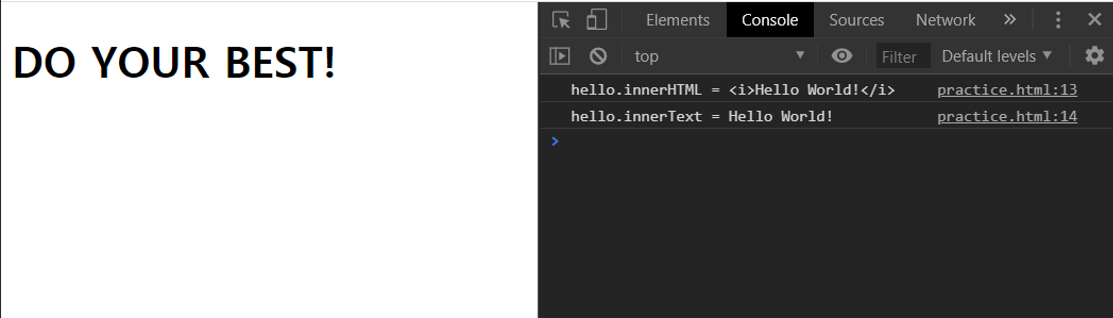
연습문제 (1) - innerHTML 속성
: h1 요소의 내부 문자 뒤에 "Hello JavaScript! "를 덧붙이는 프로그램을 작성하라.
<!DOCTYPE html>
<html>
    <head>
        <meta name="viewport" content="width=device-width">
        <meta charset="utf-8">
        <title>demo</title>
    </head>
    <body>
        <h1 id="hello">Hello World!</h1>
        <script>
            var hello = document.getElementById("hello");

            hello.innerHTML += " Hello JavaScript!";
        </script>
    </body>
</html>
연습문제 (2) - innerText 속성
: h1 요소에 i태그로 작성한 새로운 요소를 추가하는 프로그램을 작성하라 / 이때 i 요소의 내부 문자는 "Hey Yo!"로 지정
<!DOCTYPE html>
<html>
    <head>
        <meta name="viewport" content="width=device-width">
        <meta charset="utf-8">
        <title>demo</title>
    </head>
    <body>
        <h1 id="hello">Hello World!</h1>
        <script>
            var hello = document.getElementById("hello");

            hello.innerHTML += "<i> Hey Yo!</i>";
        </script>
    </body>
</html>
연습문제 (3) - style 속성
: id가 hello인 h1 요소의 color 스타일 속성을 "red"로 설정하는 프로그램을 작성하라.
<!DOCTYPE html>
<html>
    <head>
        <meta name="viewport" content="width=device-width">
        <meta charset="utf-8">
        <title>demo</title>
    </head>
    <body>
        <h1 id="hello">Hello World!</h1>
        <script>
            var hello = document.getElementById("hello");


            hello.style.color = "red";

            hello.style.marginTop = "100px";
            // 스타일 속성의 margin-top는 자바스크립트에서 -연산자로 나타나기 때문에
            // margin-top이 아닌 marginTop으로 작성해야 한다.
        </script>
    </body>
</html>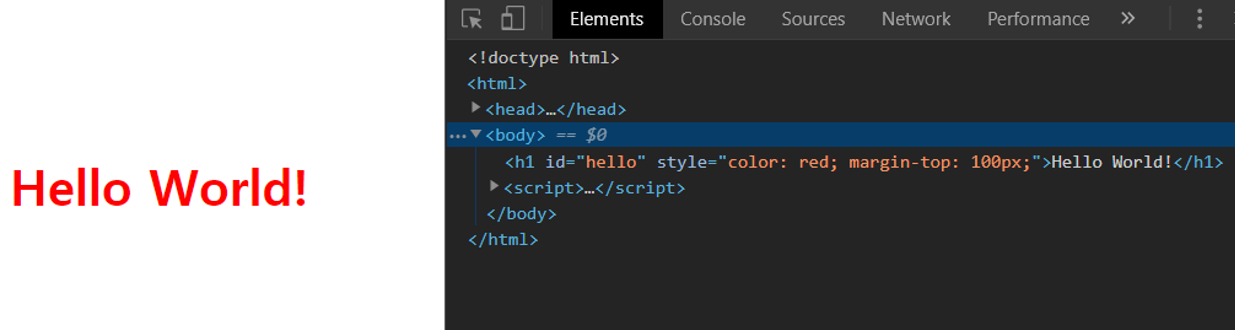
HTML 요소의 스타일 속성을 조작하고자 할 때는 Element 객체의 style 속성(property)을 통해서 조작한다.
이 style 속성은 "객체"이고, 각각의 스타일 속성을 이 객체(style 속성)의 속성으로 설정한다.
이렇게 style 속성을 통해 스타일 속성을 조작하면 요소의 인라인 스타일 속성에 지정된다.
참고로 인라인 스타일 속성은 요소에 적용된 여러 CSS 블록 중에 가장 우선 순위가 높다.
연습문제 (4) - style 속성
: id가 hello인 h1 요소의 배경색을 3초가 지난 뒤에 "darkgray"로 변경하는 프로그램을 작성하라.
<!DOCTYPE html>
<html>
    <head>
        <meta name="viewport" content="width=device-width">
        <meta charset="utf-8">
        <title>demo</title>
    </head>
    <body>
        <h1 id="hello">Hello World!</h1>
        <script>

            var hello = document.getElementById("hello");

            window.setTimeout(function () {

                hello.style.backgroundColor = "darkgray";

            }, 3000);
        </script>
    </body>
</html>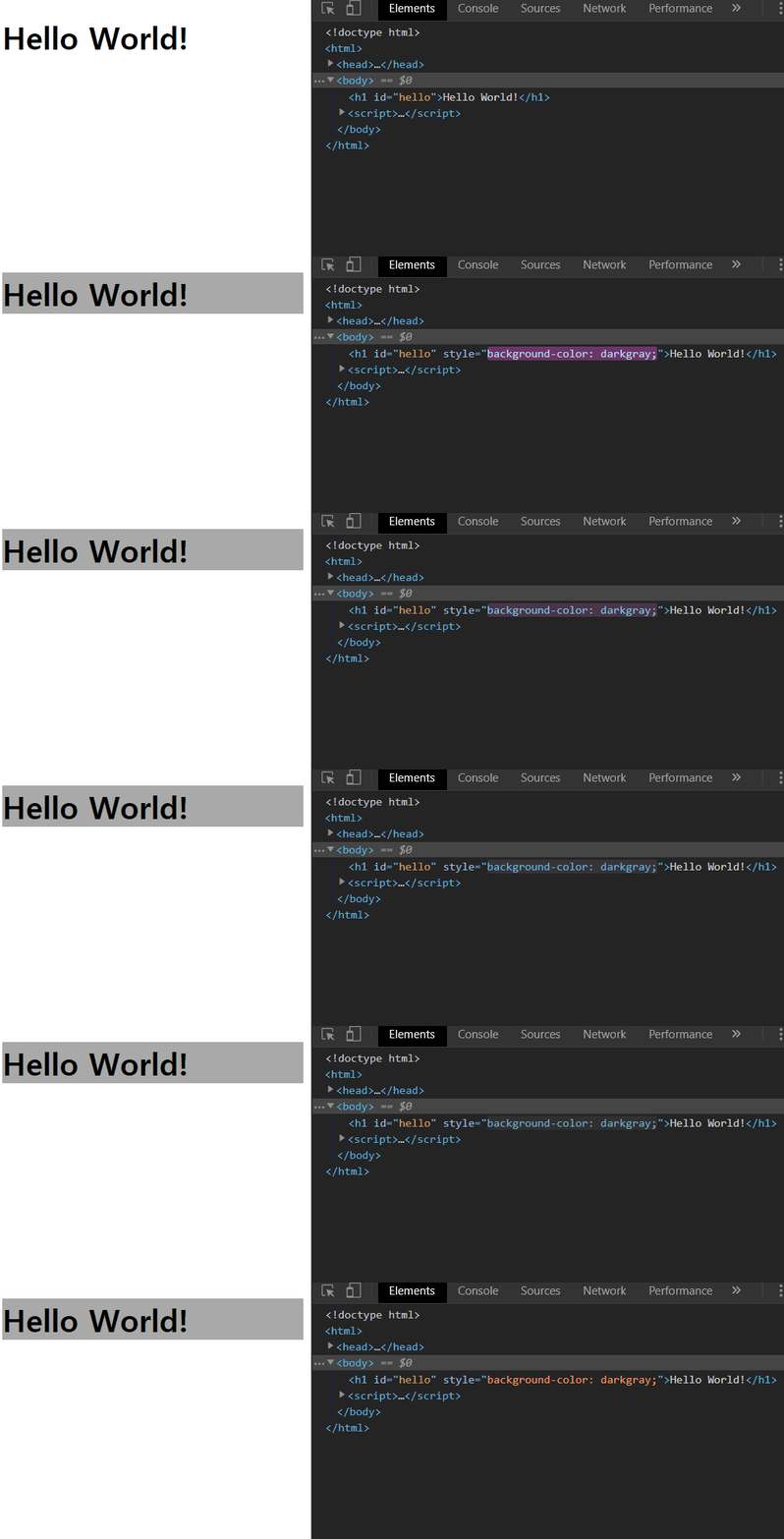
연습문제 (5) - style 속성
: id가 hello인 h1 요소의 글자 색상을 2초마다 빨간색(red), 파란색(blue), 녹색(green), 노란색(gold)으로 바꾸는 프로그램을 작성하라.
<!DOCTYPE html>
<html>
    <head>
        <meta name="viewport" content="width=device-width">
        <meta charset="utf-8">
        <title>demo</title>
    </head>
    <body>
        <h1 id="hello">Hello World!</h1>
        <script>

            var hello = document.getElementById("hello");

            var fontColor = ["red", "blue", "green", "gold"];

            var i = 0;

            window.setInterval(function () {

                hello.style.color = fontColor[i];

                i++;

                i %= fontColor.length;
                // → i = i % fontColor.length;
                // → if (i == fontColor.length) i = 0;
            }, 2000);
        </script>
    </body>
</html>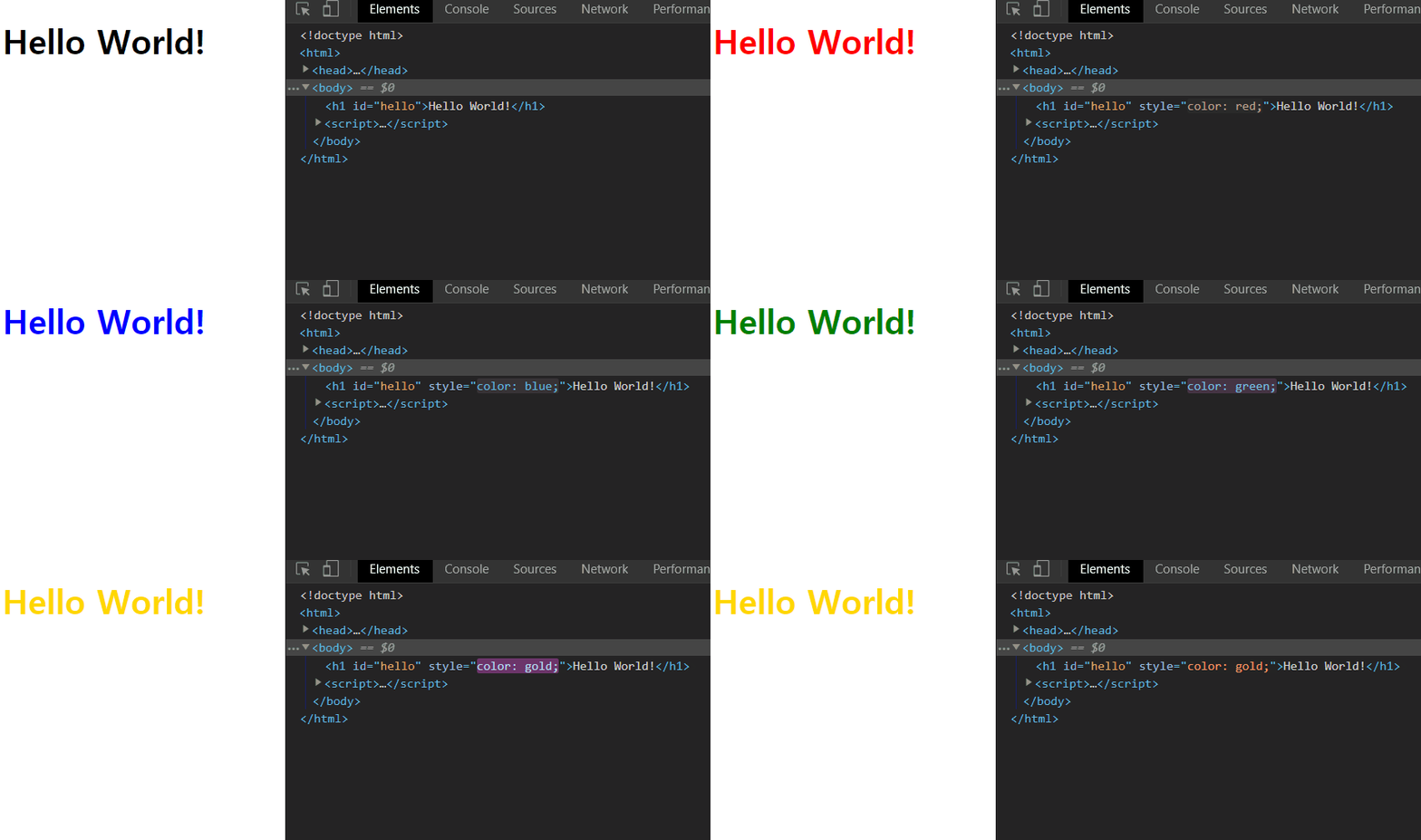
연습문제 (6) - style 속성
: 3초가 지난 후에 h1 요소가 1초에 걸쳐서 화면에서 점차 흐릿하게 사라지도록 하는 프로그램을 작성하라.
<!DOCTYPE html>
<html>
    <head>
        <meta name="viewport" content="width=device-width">
        <meta charset="utf-8">
        <title>demo</title>
    </head>
    <body>
        <h1 id="hello">Hello World!</h1>
        <script>

            var hello = document.getElementById("hello");

            window.setTimeout(function () {
                hello.style.transition = "1s";

                hello.style.opacity = "0";
                hello.style.visibility = "hidden";
            }, 3000);
        </script>
    </body>
</html>
연습문제 (7) - style 속성
: .hello 요소들의 글자 색상을 빨간색으로 변경하는 프로그램을 작성하라.
<!DOCTYPE html>
<html>
    <head>
        <meta name="viewport" content="width=device-width">
        <meta charset="utf-8">
        <title>demo</title>
    </head>
    <body>
        <h2 class="hello">Hello World!</h2>
        <h2 class="hello">Hello World!</h2>
        <h2 class="hello">Hello World!</h2>
        <script>

            var hello = document.getElementsByClassName("hello");

            // hello[0].style.color = "red";
            // hello[1].style.color = "red";
            // hello[2].style.color = "red";

            // for 반복문을 이용해 배열의 각 원소, 즉 element 객체들에 순차적으로 접근해서 조작
            for (var i = 0; i < hello.length; i++)
                hello[i].style.color = "red";
        </script>
    </body>
</html>
연습문제 (8) - style 속성
: a 요소의 내부 문자 뒤에 href 속성의 값을 덧붙이기
<!DOCTYPE html>
<html>
    <head>
        <meta name="viewport" content="width=device-width">
        <meta charset="utf-8">
        <title>demo</title>
    </head>
    <body>
        <ul>
            <li><a href="http://www.google.com">Google</a></li>
            <li><a href="http://www.naver.com">Naver</a></li>
            <li><a href="http://www.daum.net">Daum</a></li>
        </ul>
        <script>

            var links = document.querySelectorAll("a");

            // links[0].innerHTML = links[0].innerHTML + " (" + links[0].href + ")";
            // links[1].innerHTML = links[1].innerHTML + " (" + links[1].href + ")";
            // links[2].innerHTML = links[2].innerHTML + " (" + links[2].href + ")";

            for (var i = 0; i < links.length; i++) {

                links[i].innerHTML +=  " (" + links[i].href + ")";
                // document.links[i].innerHTML +=  " (" + link[i].href + ")";
                // → 굳이 변수로 객체를 지정하지 않아도 document 객체의 속성에 link가 이미 찾아져 있다

                links[i].target = "_black";
                // → 링크를 클릭했을 때 새창으로 열게 해주는 속성이 바로 target 속성이다.
                // → 예시) <li><a href="http://www.daum.net" target="_blank">Daum</a></li>
                // → 링크를 일일이 찾아서 target 속성을 주는 것 보다 for 반복문을 이용해서
                //   속성을 주는 것이 훨씬 편하다.
            }
        </script>
    </body>
</html>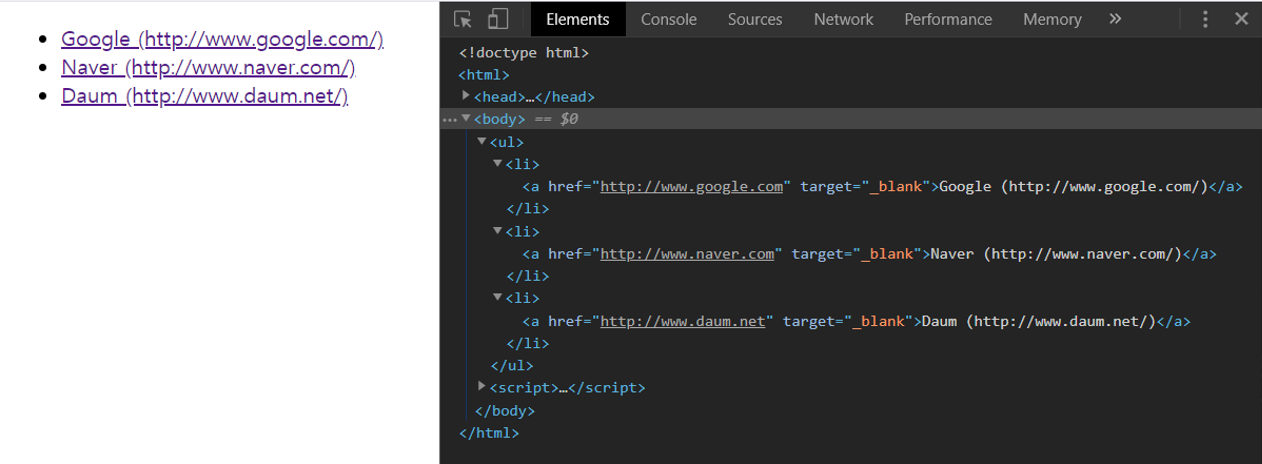
3. Element 객체의 속성 ③